Yahoo Mail tracker: the workable setup
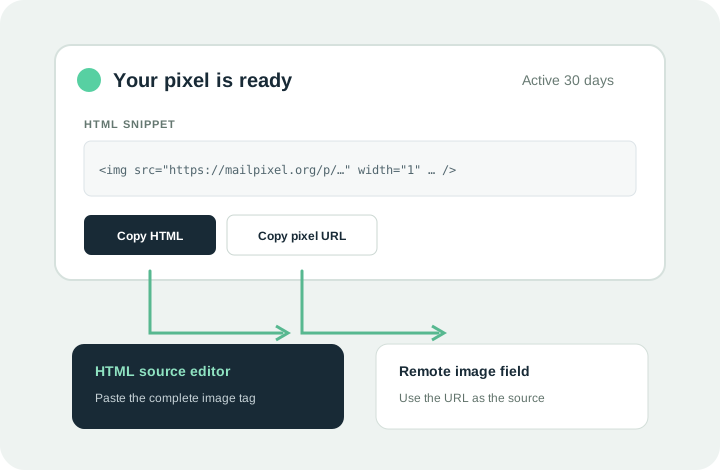
Yahoo Mail can display external images, but its documented compose workflow does not offer a raw-HTML editor or a field for an arbitrary remote image URL. A Yahoo Mail tracker therefore needs an HTML-capable sending system that preserves the MailPixel image URL.
Downloading the transparent image and attaching it to Yahoo Mail removes the live relationship with the hosted URL. The recipient may receive a file, but MailPixel will not see a request for the original URL.
Send HTML to a Yahoo recipient
Use the sender's HTML source instead of trying to paste code into Yahoo's visible composer.
- Create the pixel
Generate a real hosted pixel and choose Copy HTML. Use a generic label without personal information.
- Open an HTML template
Use your email API, campaign platform, CRM, or another sender with a documented HTML source editor.
- Paste and preserve the tag
Place the snippet inside the message body. The delivered source must still point to
https://mailpixel.org/p/…. - Test in Yahoo Mail
Send to an account you control. Check activity before clicking “show images” or opening the message on another device.
Yahoo Mail tracker image settings change the signal
The recipient controls whether external images load.
Always, except Spam
The remote pixel may be requested when Yahoo renders the message. Automated handling or caching can still affect timing.
Ask before showing external images
No request may appear until the recipient allows external images. A real read can therefore produce no MailPixel event.
These settings create both false negatives and ambiguous positives. The useful claim is “the image URL was requested at this time,” not “this person definitely read the email.”
Debug a Yahoo Mail tracker
Check the message pipeline in this order.
Rich HTML survived
View the delivered source and verify the remote <img> tag remains.
The pixel is active
Open the private activity page from the browser that created it and confirm it has not expired or been paused.
External images can load
Test both Yahoo image preferences. A blocked image is expected to produce no request.
Do not: paste the HTML snippet as visible text, attach a downloaded pixel, or open the public pixel URL to “check” it. Each action either breaks tracking or contaminates the activity.
Yahoo's current help explains external-image display settings, embedded image limitations, and the new Yahoo Mail attachment workflow. Checked September 20, 2026. MailPixel is independent and is not affiliated with Yahoo.